Synchronous Point-to-Point Failover #
For mission-critical services, storage system failures or entire site failures can lead to service interruptions and data loss. Traditional disaster recovery solutions based on asynchronous replication may result in partial data loss during a failure, and failover typically requires manual intervention and has a long recovery time. As virtualization, databases, and archive services increasingly demand “zero interruption” and “zero loss,” enterprises need a solution that can synchronously protect data and automatically take over across a metropolitan area.
QMetro’s core is synchronous cross-site data protection: the same data exists simultaneously in two storage systems, and when a device or site fails, the other side automatically takes over, aiming to achieve a RPO (Recovery Point Objective) of zero data loss and a near-zero RTO (Recovery Time Objective). QMetro manages this through a single XInsight interface and employs a witness mechanism for arbitration to prevent split-brain scenarios.
INFORMATION
To utilize the QMetro feature, please check the latest XInsight environment and the license active status before configuring.
This document is intended for system architects, storage administrators, and technology decision-makers, and covers the architecture, features, operation, deployment, and limitations of QMetro.
Theory of Operation #
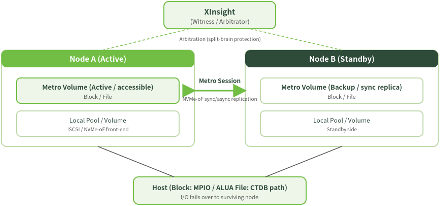
QMetro is a synchronized data protection solution that spans two storage systems (nodes) located within a metropolitan area. Dedicated replication links keep data synchronized, ensuring data consistency across both arrays. The protected volumes synchronized on both sides are called metro volumes; metro volumes are synchronized via metro sessions; in the event of a node failure, the surviving side takes over, with the option of arbitration by a Witness Node.
Design Goals #
- RPO: The goal of the synchronized mode is zero data loss.
- RTO: Automatic failover minimizes service interruption, aiming for near-zero switchover time.
- Business Continuity: Maintaining the availability of critical services during maintenance or single-site failures.
Scope #
QMetro protects block and file volumes. Designed for VMware, Windows Server, and Linux cluster environments, it is suitable for virtualization platforms, databases, and cross-site critical workloads.
Architecture #
QMetro consists of four core roles: Metro, Metro Volume, Metro Session, and Witness, as well as defined host connections. The overall architecture is shown in the diagram below.
Figure – QMetro Architecture
Metro #
A Metro is the configuration unit of QMetro, a high-availability pair of two nodes. Enabling QMetro requires designating two nodes and pairing volumes on both sides to create Metro Volumes. A node can join only one Metro. After creation, each node maintains a heartbeat with its peer via a background service to detect peer status.
Table – Heartbeat Behavior
| Heartbeat | Behavior |
|---|---|
| Interval | One heartbeat per second. |
| Offline Detection | Five consecutive failed heartbeats mark the peer node as offline. |
| Online Detection | Three consecutive successful heartbeats mark the offline peer node as back online. |
Metro Volume #
A Metro Volume is the protected logical volume; only one side can be accessed of active at a time, while the other side is used as a synchronous replica. Both block and file volumes can become Metro Volumes and support synchronous or asynchronous modes. Paired volumes must meet consistency prerequisites, such as identical size, identical type (both block or both file), identical block size, and no existing QReplica (remote replication) tasks exist. In addition, asynchronous mode also requires sufficient snapshot space on the replica side.
Metro Sessions #
Metro Sessions synchronize data between the paired Metro Volumes via dedicated replication connections. NVMe-oF (TCP / RoCE) has been validated as the transport protocol during the preview stage. A dedicated network interface must be specified for replication traffic, with a recommended priority of 100 GbE > 25 GbE > 10 GbE. Multiple data-path IPs can be configured on the same interface to achieve multipath connectivity.
Witness Node #
In our design, XInsight can act as a Witness Node. It is an optional component. When two nodes cannot directly confirm each other’s status, the Witness Node provides third-party arbitration to determine the liveness of the peer node, preventing both from operating simultaneously (split-brain). If there is no Witness Node, the user interface will clearly display an increased risk status.
Metro Volume States #
Table – Metro Volume States
| State | Description |
|---|---|
| OK | A unique active volume, healthy, residing on the preferred node. |
| Degrade | A unique healthy active volume on a non-preferred node; or another volume within the same Metro Volume is abnormal. |
| Fail | A unique active volume with a failed state. |
| Unknown | The presence of multiple or no active volumes may indicate a split-brain situation, requiring manual confirmation. |
High Availability #
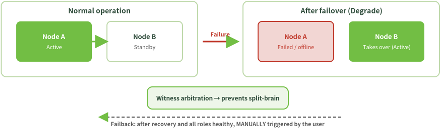
The high availability value of QMetro lies in its automatic takeover in the event of failure and its safe recovery afterward, as shown in the diagram below.
Figure – Failover and Failback
Failover #
When a node goes offline and the Witness Node detects the absence of a peer, the surviving node will automatically take over and host I/O will be transferred accordingly; the Metro Volume enters a Degraded state. Block environments switch paths via MPIO / ALUA; file environments take over service addresses via CTDB cluster paths.
Failback #
After the fault is resolved and all roles are back online, the failback conditions are met. Users must manually trigger failback to ensure data consistency before returning to the preferred node. When a node returns online, its local volume first assumes the BACKUP role and is restored according to conditions, thus avoiding split-brain.
TIP
QMetro currently uses manual failback after fault resolution. Automatic switchback is not yet provided.
Split-Brain Protection #
When inter-node connectivity is abnormal, the Witness Node provides third-party arbitration to prevent both nodes from providing services simultaneously. Without a Witness Node, the system will lack an arbitration source; the user interface clearly displays the high-risk state, and fault handling requires more careful manual confirmation.
Host Connectivity and Topology #
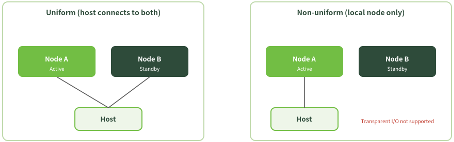
QMetro supports both uniform and non-uniform host connectivity topologies, as shown in the diagram below.
Figure – Uniform vs. Non-uniform Host Connectivity
Block and File Connections
- Block I/O: Hosts connect to both nodes via MPIO; ALUA indicates the preferred path; in the event of a single-sided failure, I/O switches to the other node.
- File I/O: Hosts connect via a CTDB cluster path; in the event of a single-sided failure, the other node takes over the service address.
Uniform and Non-uniform Topologies
In a uniform topology, hosts connect to both sides; in a non-uniform topology, hosts connect only to the local node. In either case, block environments require the use of MPIO and ALUA to correctly select the path.
TIP
Non-uniform topologies do not support transparent I/O.
Deployment and Operations #
Prerequisites #
This system has explicit limitations on the number of tasks and execution capabilities. Each system supports a maximum of 32 metro volumes. In terms of execution, a maximum of 2 session paths are allowed to run concurrently to maintain overall system performance and stability.
Table – QMetro Parameters
| Item | Value |
|---|---|
| Maximum number of nodes | 2 |
| Maximum number of metro volumes | 32 |
| Maximum number of session path | 2 |
| Heartbeat interval | 1 sec. |
| Heartbeat timeout | 1 sec / endpoint probe |
| Offline measurement | 20 consecutive failures |
| Online measurement | 3 consecutive successes |
| Asynchronous schedule | 1 hour |
| Asynchronous snapshot space | 2 x volume capacity |
| Asynchronous pool concurrency | 1 task / pool |
System Requirements #
Nodes and Architecture
QMetro is based on dual-controller nodes; a Metro consists of two nodes. Supported platforms are XEVO 3 and QSM 4. To use the witness function, all nodes must be registered and verified in the XInsight device inventory.
Replication Network
Table – Replication Network Requirements
| Item | Recommendation / Description |
|---|---|
| Default | 1 × 25 GbE dedicated replication interface |
| Minimum | 1 × 10 GbE (10 GbE does not guarantee latency and throughput) |
| Maximum | 4 × 10 / 25 GbE or 1 × 100 GbE |
| Interface Priority | 100 GbE > 25 GbE > 10 GbE |
| Network Prerequisites (Synchronous) | Inter-site RTT ≤ 5 ms; bandwidth ≥ 250 Mbps per replication stream |
The RTT (Round-Trip Time) and bandwidth mentioned above are prerequisites (network requirements) for synchronous mode deployment, not performance guarantees. If inter-site connectivity cannot meet the requirements, please consider asynchronous mode.
Witness Service and Compatibility #
The witness service is provided by XInsight as a resident background service; it is recommended to enable it in production environments. QMetro’s target platforms include VMware, Windows Server, and Linux clusters.
Licensing #
Each node needs to subscribe to the QMetro service.
Deployment Architecture #
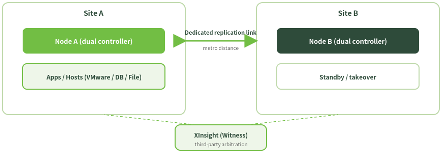
A typical deployment consists of two nodes located at two sites, connected via a dedicated replication link, with XInsight acting as the witness server, shown in the diagram below.
Figure – Two-Node Architecture
Deployment Process #
The following are conceptual steps.
- Deploy dual controller nodes at both sites, complete basic networking, and register with XInsight.
- Plan and configure the dedicated replication interface (priority 100 GbE > 25 GbE > 10 GbE).
- Create volumes at both ends that meet consistency requirements; create Metro and Metro Volumes from XInsight.
- Select synchronous or asynchronous mode and enable the witness server.
- Configure MPIO / ALUA (for block storage) or CTDB (for file volume) paths on the host.
- Verify synchronization on the control panel and practice failover and confirm fault recovery.
Configure QMetro Volumes #
Creating Metro and Metro Volumes #
In XInsight, select two nodes that have not yet been merged into other Metro instances, pair volumes that meet consistency prerequisites, choose synchronous or asynchronous replication, and specify a dedicated replication interface.
TIP
Before creating, ensure that: the size, type, and block size of both ends are the same and there are no existing replication tasks. For asynchronous replication, the replica end has sufficient snapshot space.
Witness Configuration and Monitoring #
Witness can be enabled or disabled for each Metro instance. It is recommended to enable it in a production environment. The Dashboard in XInsight provides real-time and historical status with RBAC (Role-Based Access Control).
Failover and Failback #
Failover is automatic, failback requires manual triggering.
Deletion and Cleanup #
The Metro, Metro Volume, Metro Session, and Witness settings can be released and deleted in sequence. Temporary resources can be reclaimed and restored to their initial baseline state through the XInsight user interface.
Video Tutorial #
This is a tutorial example to configure a Metro Volume. See QMetro – Zero-Data-Loss Metro Cluster Storage Solution.
Best Practices #
- Use a dedicated interface to handle replication traffic, avoiding contention with frontend I/O.
- Select synchronous or asynchronous mode based on inter-site distance and latency. Conduct a POC (Proof of Concept) evaluation before deployment.
- Enable a witness server in the production environment for third-party arbitration. Deploy the witness server (XInsight) in a location independent of the two sites (a third-party site or an independent network segment) to ensure arbitration continues even if inter-site link failures occur.
- Combine Metro (cross-site protection) with snapshots (point-in-time recovery) for site-level and logical-level protection.
- Regularly practice failover and failback. Monitor Metro Volume status, synchronization status, and event logs.
- For asynchronous mode, configure sufficient snapshot space on the replica side to support planned replication.
Conclusion
QMetro offers synchronized cross-site data protection. By coordinating Metro Volumes, Metro Sessions, and Witness (all managed within a single XInsight interface), it aims to achieve zero data loss and rapid failover for mission-critical applications. QMetro supports both block and file storage and is compatible with scale-out and snapshot technologies, meeting the needs of various enterprise application scenarios.
Appendix
Apply To #
- QSM firmware 4.3.0 and later
- XEVO firmware 3.3.0 and later
- XInsight 1.7.0 and later
- QMetro subscription license for each node